Template:Annotated

This template provides annotated images, all toolbars and both docks. Working on automatically generating it.


Example:

{{Annotated|TransportToolbar}}
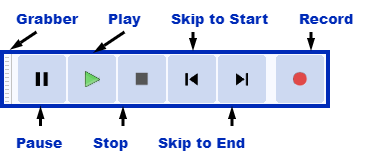
Grabber for...For...Pause for...For...Play for...For...Stop for...For...Skip to Start for...For...Skip to End for...For...Record for...For...Transport Toolbar - click on the image to see this toolbar displayed in the default context of the upper tooldock layout
Click for details
Click for details
Click on the image to learn more


Example: (with faded background style)

{{Annotated|TransportToolbarA}}
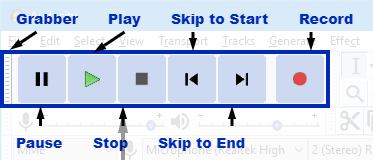
Grabber for...For...Pause for...For...Play for...For...Stop for...For...Skip to Start for...For...Skip to End for...For...Record for...For...Transport Toolbar - click on the image to see this toolbar displayed in the default context of the upper tooldock layout
Click for details
Click for details
Click on the image to learn more


Example:

{{Annotated|ToolsToolbar}}
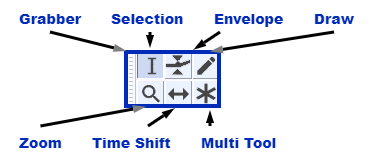
Grabber for...For...Zoom for...For...Selection for...For...Time Shift for...For...Envelope for...For...Multi Tool for...For...Draw for...For...Tools Toolbar - click on the image to see this toolbar displayed in the default context of the upper tooldock layout
Click for details
Click for details
Click on the image to learn more


Example:

{{Annotated|SelectionToolbar}}
Grabber for...For...Project Rate for...For...Snap To for...For...Audio Position for...For...Start for...For...End for...For...Selection Type Chooser for...For...Selection Toolbar - click on the image to see this toolbar displayed in the default context of the upper tooldock layout
Click for details
Click for details
Click on the image to learn more


Example:

{{Annotated|RecordingMeterToolbar}}
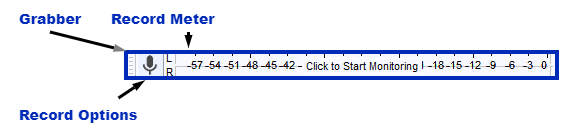
Grabber for...For...Record Options for...For...Record Meter for...For...Recording Meter Toolbar - click on the image to see this toolbar displayed in the default context of the upper tooldock layout
Click for details
Click for details
Click on the image to learn more


Example:

{{Annotated|PlaybackMeterToolbar}}
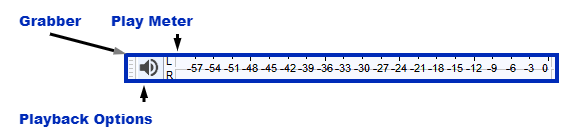
Grabber for...For...Playback Options for...For...Play Meter for...For...Playback Meter Toolbar - click on the image to see this toolbar displayed in the default context of the upper tooldock layout
Click for details
Click for details
Click on the image to learn more


Example:

{{Annotated|MixerToolbar}}
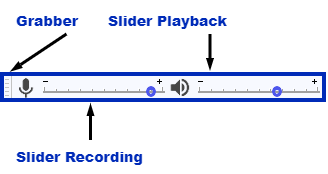
Grabber for...For...Slider Recording for...For...Slider Playback for...For...Mixer Toolbar - click on the image to see this toolbar displayed in the default context of the upper tooldock layout
Click for details
Click for details
Click on the image to learn more


Example:

{{Annotated|EditToolbar}}
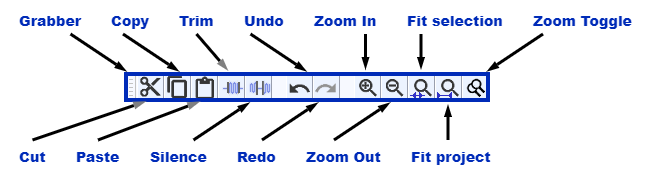
Grabber for...For...Cut for...For...Copy for...For...Paste for...For...Trim for...For...Silence for...For...Undo for...For...Redo for...For...Zoom In for...For...Zoom Out for...For...Fit selection for...For...Fit project for...For...Zoom Toggle for...For...Edit Toolbar - click on the image to see this toolbar displayed in the default context of the upper tooldock layout
Click for details
Click for details
Click on the image to learn more


Example:

{{Annotated|ZoomToolbar}}
This ednote will automagically be replaced by the Annotated image ZoomToolbarAnnotated.png, when it is ready


Example:

{{Annotated|DeviceToolbar}}
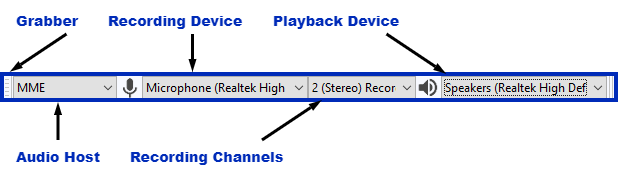
Grabber for...For...Audio Host for...For...Recording Device for...For...Recording Channels for...For...Playback Device for...For...Device Toolbar - click on the image to see this toolbar displayed in the default context of the upper tooldock layout
Click for details
Click for details
Click on the image to learn more


Example:

{{Annotated|TranscriptionToolbar}}
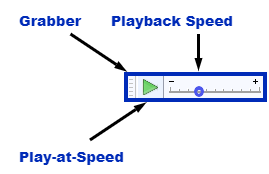
Grabber for...For...Play-at-Speed for...For...Playback Speed for...For...Transcription Toolbar - click on the image to see this toolbar displayed in the default context of the upper tooldock layout
Click for details
Click for details
Click on the image to learn more


Example:

{{Annotated|ScrubToolbar}}
This ednote will automagically be replaced by the Annotated image ScrubToolbarAnnotated.png, when it is ready